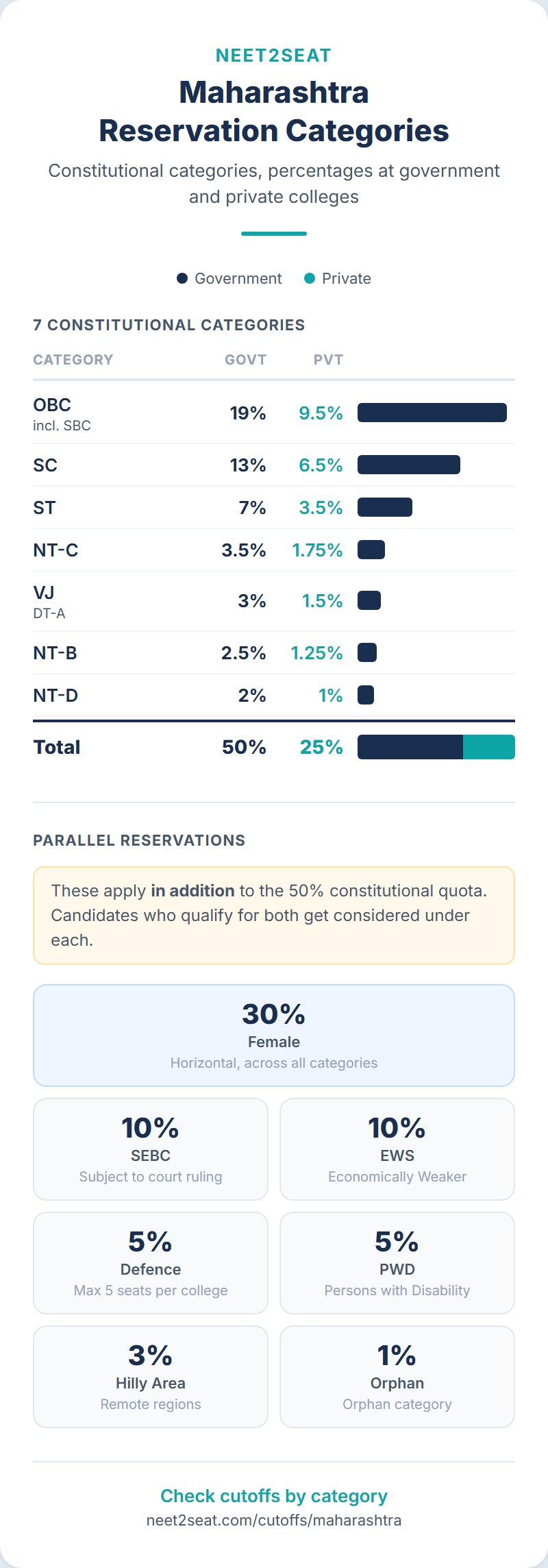
- Maharashtra recognizes 7 constitutional categories (50% at government colleges), 2 additional categories (SEBC 10%, EWS 10%), and 6 parallel reservation types.
- Your Maharashtra category may differ from your central government category. Check the state backward classes list for your specific caste.
- Non-Creamy Layer certificates are required for VJ, NT-B, NT-C, NT-D, SEBC, and OBC candidates. SC and ST are exempt.
- All category claims must be made in the original application. You cannot add or change after the deadline.
Maharashtra’s category system is not the same as the central government’s
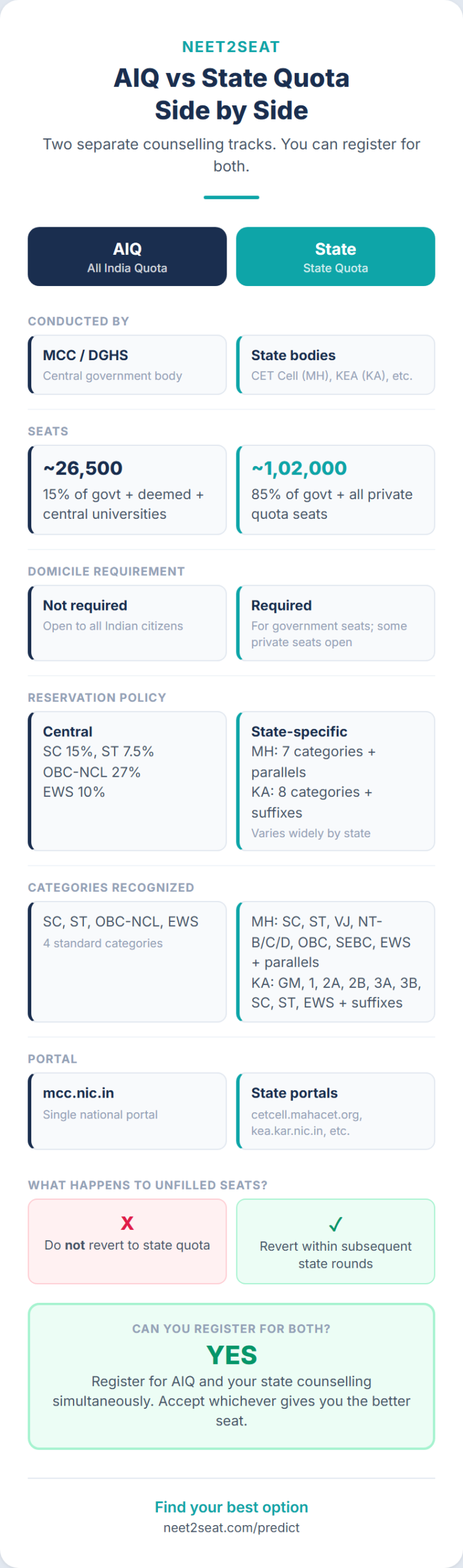
If you have only seen the MCC (All India Quota) counselling categories (SC, ST, OBC-NCL, EWS, General), Maharashtra’s category list will look unfamiliar. The state recognizes seven constitutional reservation categories, two additional reservation categories, and six specified (parallel) reservation types. These categories determine which seats you can compete for, what cutoffs apply to you, and which documents you need.
Your central government category (for MCC counselling) and your Maharashtra state category (for CET Cell counselling) are determined by different lists. Some castes appear on both, some only on one. You could be OBC centrally and NT-C in Maharashtra, or vice versa. Check your specific caste against the Maharashtra backward classes list independently.
This guide covers every category used in Maharashtra NEET UG state counselling, based on the 2025 Information Brochure issued by the CET Cell and the reservation rules in Annexure B. If you are looking for Karnataka categories, see our Karnataka categories guide.
Constitutional reservation categories: 50% at government colleges
These seven categories account for 50% of state quota seats at government and corporation medical colleges in Maharashtra. At private unaided colleges, the same seven categories share 25% of total intake (exactly half the government percentages).
SC (Scheduled Castes and SC converts to Buddhism): 13% government, 6.5% private
Maharashtra’s SC reservation includes both Scheduled Castes and Scheduled Caste converts to Buddhism (Nav-Baudh). Maharashtra has a large Buddhist population (mostly Ambedkarite conversions), which is why Nav-Baudh are included under SC rather than as a separate category. The state percentage (13%) is lower than the central government’s 15% for SC at AIQ, but the eligible group is broader because it includes Nav-Baudh converts who may not be on the central SC list. No Non-Creamy Layer certificate is required for SC candidates. Caste certificate and Caste Validity Certificate (CVC) from the Divisional Caste Certificate Scrutiny Committee are required.
ST (Scheduled Tribes): 7% government, 3.5% private
Includes Scheduled Tribes living both within and outside specified scheduled areas. Same as the national list. Tribe Validity Certificate from the Tribe Certificate Scrutiny Committee is required (different authority from the SC committee). No Non-Creamy Layer certificate needed.
VJ / DT-A (Vimukta Jati / Denotified Tribes A): 3% government, 1.5% private
Vimukta Jati literally means “liberated castes.” These are communities that were classified as “criminal tribes” under British colonial law (the Criminal Tribes Act of 1871) and were “denotified” after independence. The term DT-A (Denotified Tribes Category A) is used interchangeably with VJ. This category has no equivalent in the central government reservation system. For AIQ counselling, VJ candidates may qualify as OBC-NCL if their specific caste is on the central OBC list.
Non-Creamy Layer certificate is required (valid up to 31 March 2026 for the 2025-26 cycle). Caste certificate and CVC also required.
NT-B (Nomadic Tribes B): 2.5% government, 1.25% private
Nomadic Tribes are communities with historically itinerant lifestyles who do not have fixed settlements. Maharashtra divides them into three sub-categories (B, C, D) with separate reservation percentages. NT-B is the first of these. The specific castes in each sub-category are listed in state government notifications. Non-Creamy Layer certificate required.
NT-C (Nomadic Tribes C): 3.5% government, 1.75% private
The second Nomadic Tribes sub-category. Carries a slightly higher reservation percentage than NT-B. In the inter-se mechanism for unfilled seats, NT-C falls in Group III (along with NT-D and OBC), while NT-B falls in Group II (with VJ). This grouping matters when reserved seats go unfilled. Non-Creamy Layer certificate required.
NT-D (Nomadic Tribes D): 2% government, 1% private
The third Nomadic Tribes sub-category, with the smallest allocation among the three. Falls in Group III for inter-se purposes. Non-Creamy Layer certificate required.
OBC (Other Backward Classes, including SBC): 19% government, 9.5% private
Maharashtra’s OBC reservation at 19% is lower than the central government’s 27%, but the state’s overall 50% constitutional reservation is distributed across seven categories rather than the central government’s three. OBC here includes SBC (Special Backward Classes). SBC candidates are drawn from their parent OBC category; they do not have a separate reservation percentage. Non-Creamy Layer certificate required.
Private college calculation
At private unaided colleges, the total constitutional reservation is 25% (not 50%). The seven category percentages are exactly half the government figures. This comes from Maharashtra Act No. XXX of 2006. The remaining 75% includes open merit seats, institutional quota (15% on all-India basis), and female reservation.
Additional reservation categories
SEBC (Socially and Educationally Backward Classes): 10%
SEBC is a separate 10% reservation applied to available state quota seats at government, government-aided, corporation, and private unaided colleges (excluding minority institutions). It was introduced through a Maharashtra government resolution and is currently subject to the outcome of Writ Petition No. 3468/2024 in the Bombay High Court. If the court strikes it down, these seats revert to general category.
SEBC candidates must claim the category in their online application form. Non-Creamy Layer certificate required. If SEBC seats go unfilled, they revert to general category (they do not participate in the three-group inter-se mechanism that applies to the seven constitutional categories).
EWS (Economically Weaker Sections): 10%
The EWS certificate must be in the Maharashtra state government format (Annexure T of the Information Brochure). Central government format certificates are explicitly rejected. EWS candidates cannot belong to any constitutional reservation category. If you hold SC, ST, VJ, NT, OBC, SEBC, or SBC status, you are not eligible for EWS.
A 10% reservation for economically weaker candidates from the general (unreserved) category, applied to available state quota seats at the same institution types as SEBC. Like SEBC, unfilled EWS seats revert directly to general category without inter-se.
Specified (parallel) reservation categories
These reservations operate in parallel with constitutional reservation. A candidate can simultaneously benefit from a constitutional category (say, SC) and a specified quota (say, Female or PWD). The seat is coded with both designations. In our Maharashtra cutoff analyzer, you will see compound categories like “SCW” (SC Female) or “OPENDEFPH” (Open category, Defence, PWD) reflecting these parallel reservations.
DEF (Defence): 5% of intake, maximum 5 seats per college
Reserved for children of defence personnel at government, corporation, and government-aided colleges only. Three sub-categories:
- DEF-1: Children of ex-servicemen with Maharashtra domicile
- DEF-2: Children of active service personnel with Maharashtra domicile
- DEF-3: Children of active service personnel transferred to Maharashtra
If defence seats in one sub-category go unfilled, they transfer to the other two sub-categories by inter-se merit. The minimum eligibility for defence quota is the same as for open merit candidates. Defence quota is a specified reservation, so these seats are allotted before general seats in each round.
PWD (Persons with Disability): 5% of sanctioned intake
Under the Rights of Persons with Disabilities Act 2016, 5% of seats are reserved for candidates with benchmark disabilities. Constitutional reservation applies within PWD quota seats (so there are PWD-SC, PWD-ST, PWD-OBC seats, etc.). The disability certificate must be from one of the 16 designated Disability Assessment Boards listed in the Information Brochure and must be issued in 2025. Certificates from other medical boards are not accepted.
Unfilled PWD seats revert to the respective constitutional category in the state quota. No fresh preferences are called; the reverted seats are added to the seat matrix and allotted based on existing preferences.
HA (Hilly Area): 3% at government/corporation MBBS colleges only
Reserved for candidates from designated hilly areas in Maharashtra. Only applies to government and corporation medical colleges, and only for the MBBS course. Constitutional reservation and female reservation apply within HA quota. If HA seats go unfilled, they revert to the state quota in the respective category.
Orphan: 1% of available seats
For candidates with orphan status, certified by the Women and Child Welfare Department. Constitutional reservation applies within orphan quota seats. Unfilled orphan seats revert to respective categories.
Female: 30% at all colleges under CAP
The 30% female reservation operates in parallel with constitutional reservation. A seat can be simultaneously coded as SC (constitutional) and Female (specified). The total effective reservation can exceed 50% because of this parallel operation. Female candidates are first allotted female quota seats; after those are exhausted, they compete for general seats on merit.
MKB (Maharashtra-Karnataka Border): specified quota
For residents of the Maharashtra-Karnataka border disputed area. Filled from the state merit list. Unfilled MKB seats revert to Open category since they are carved from it. MKB is allotted before general seats.
How inter-se works for unfilled seats
Maharashtra’s three-group inter-se cascade: Group I (SC and ST share unfilled seats), Group II (VJ and NT-B share), Group III (NT-C, NT-D, and OBC share). If still unfilled after within-group sharing, seats go to combined merit of all reserved categories, then to open merit. SEBC and EWS are excluded from this cascade; their unfilled seats go directly to general category.
The inter-se round runs at the end of each admission process, during Round 3. It is not a separate round that candidates need to register for; it operates on existing preferences.
Ear-marking: when reserved category candidates qualify on open merit
When a reserved category candidate’s NEET AIR qualifies them for an open merit seat, the candidate can choose: take the open seat, or take a seat under their reserved category. If they choose the reserved category seat, one open seat at the college where they would have been admitted on open merit is “ear-marked” for the next eligible candidate from their reserved category.
This prevents a situation where high-ranking reserved category candidates occupy open seats while blocking seats for lower-ranking candidates from their own category. The ear-marked seat is filled immediately in the same round.
Ear-marking applies only to constitutional reservation categories. It does not apply to specified reservations (DEF, PWD, HA, Female, Orphan, MKB).
What our data shows about category cutoffs
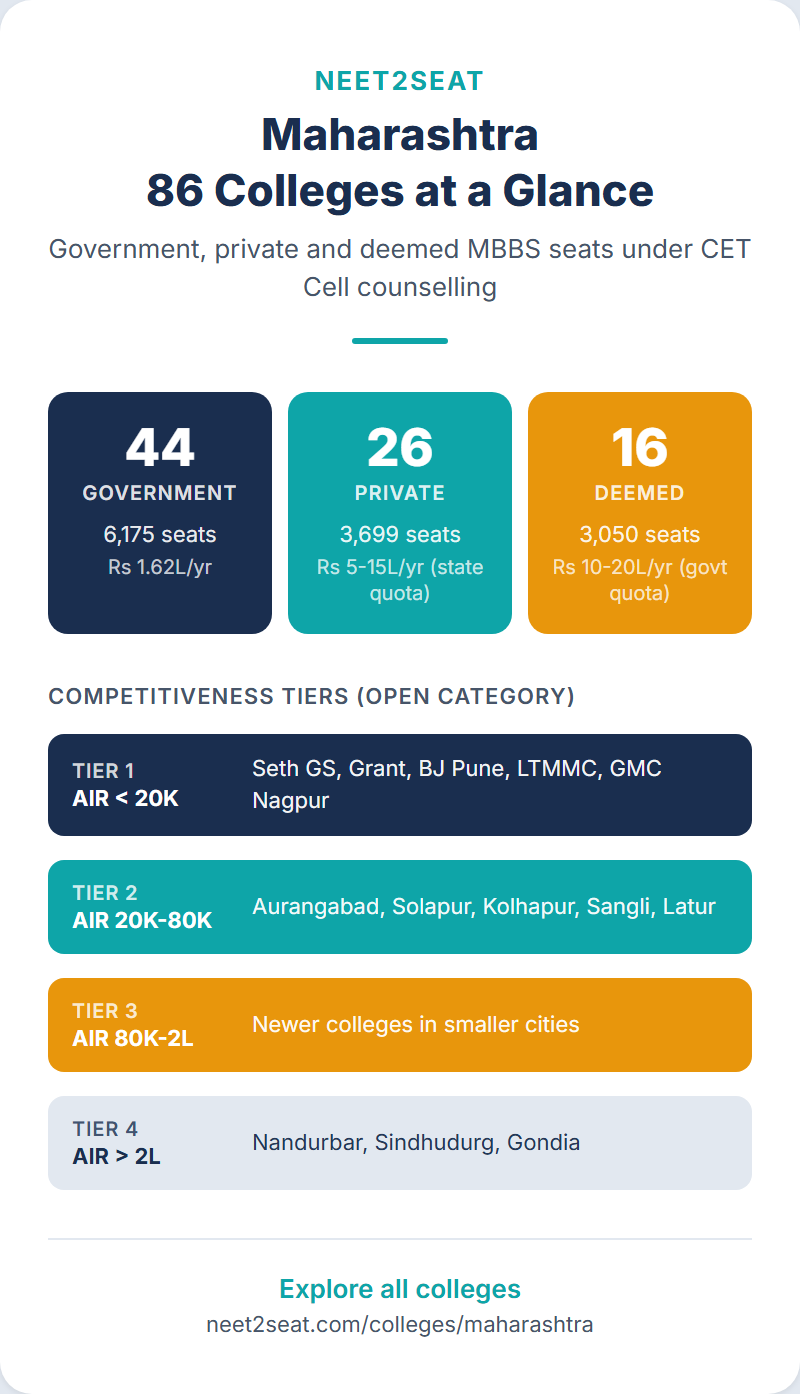
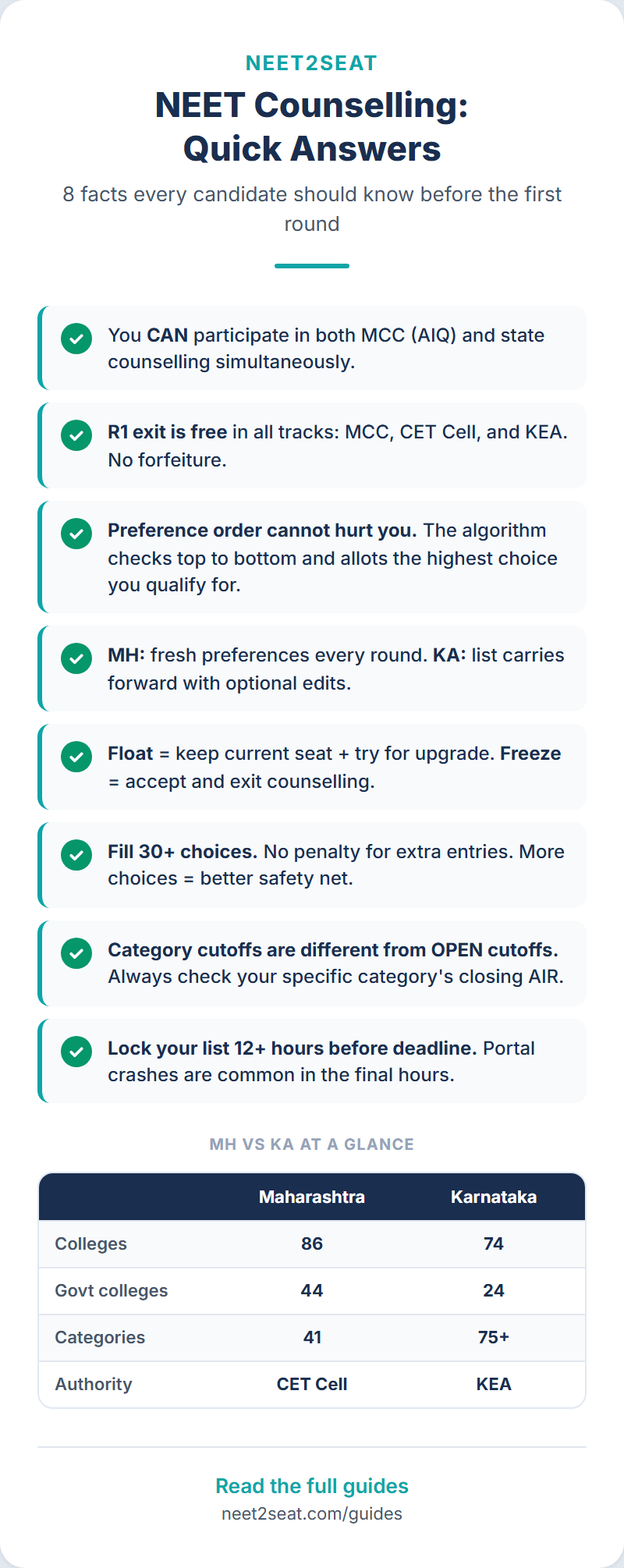
Our database tracks allotment data for 86 Maharashtra colleges across 2023, 2024, and 2025, with 41 distinct seat categories (including compound categories from parallel reservations). You can filter cutoffs by any of these categories using the Maharashtra cutoff analyzer.
Some patterns from the data:
The gap between OPEN and reserved category closing AIRs varies widely by college. At the most competitive government colleges (Seth GS/KEM, BJ Pune), the OPEN closing AIR in 2025 was around 2,500 to 8,600. SC closing AIRs at the same colleges were typically 2x to 4x higher (less competitive). At mid-tier government colleges, the OPEN-to-SC gap narrows.
SEBC and EWS closing AIRs tend to fall between OPEN and the constitutional reservation categories, since these candidates must first not qualify under any constitutional category.
Female reservation (the “W” suffix in our data, as in “OPENW” or “SCW”) consistently shows slightly higher closing AIRs than the corresponding non-female category at the same college. The 30% parallel reservation for women means additional seats open up, and these seats tend to close at higher (less competitive) AIRs than the general category equivalent.
Documents needed for each category
| Category | Required documents |
|---|---|
| SC, ST | Caste/Tribe certificate + Caste/Tribe Validity Certificate |
| VJ, NT-B, NT-C, NT-D, OBC (incl. SBC) | Caste certificate + CVC + Non-Creamy Layer certificate (valid up to 31/3/2026) |
| SEBC | Caste certificate + CVC + Non-Creamy Layer certificate |
| EWS | EWS certificate in state government format (Annexure T), for 2025-26 |
| DEF | Defence service certificate per Annexure C |
| PWD | Disability certificate from designated board, issued in 2025 |
| HA | Hilly Area residence certificate per Annexure F |
| Orphan | Orphan certificate from Women and Child Welfare Dept |
| MKB | MKB area certificate per Annexure E |
All category claims must be made in the original online application form. You cannot add or change your category after the deadline. If you fail to produce required documents at physical verification, you are automatically treated as OPEN category. Start gathering documents the moment your NEET result is out. See our documents guide for the complete checklist.
Non-Creamy Layer: the detail that trips people up
The NCL certificate is required for VJ, NT-B, NT-C, NT-D, SEBC, and OBC (including SBC) candidates. SC and ST are exempt. If your NCL certificate is missing, expired, or in the wrong format at document verification, your reservation claim is denied and you are treated as OPEN. If your AIR does not qualify under OPEN at your allotted college, your admission is cancelled. The Information Brochure states this twice. Verification officers enforce it strictly.
The certificate is issued by the Sub-Divisional Officer, Deputy Collector, or Collector of the district and must be valid up to 31 March 2026 or later. The “creamy layer” concept excludes candidates whose families exceed a certain income or asset threshold from reservation benefits.
FAQ
I am OBC in the central list. Does that automatically make me OBC in Maharashtra?
Not necessarily. The central OBC list and the Maharashtra OBC list are different. Some castes appear on both, some only on one. Your Maharashtra category is determined by Maharashtra state notifications. Check your specific caste against the Maharashtra backward classes list. You could be OBC centrally and NT-C in Maharashtra, or vice versa.
What is the difference between VJ and NT categories?
VJ (Vimukta Jati) comprises communities that were classified as “criminal tribes” under British law and later denotified. NT (Nomadic Tribes) comprises communities with historically nomadic lifestyles. Both are socially marginalized groups, but the historical basis for their classification differs. In the inter-se mechanism, VJ and NT-B form Group II, while NT-C, NT-D, and OBC form Group III.
Can I claim both constitutional reservation and EWS?
No. EWS is specifically for candidates from the general (unreserved) category. If you belong to SC, ST, VJ, NT-B, NT-C, NT-D, OBC, SEBC, or SBC, you are not eligible for EWS reservation. You claim one or the other, not both.
What does “SBC” mean in the context of OBC?
Special Backward Classes (SBC) are a sub-group within OBC. Per Maharashtra Act No. XXX of 2006, SBC candidates are considered from within the OBC reservation quota. They do not have a separate reservation percentage. In practice, SBC candidates compete under the 19% OBC allocation.
Do specified reservations (Female, DEF, PWD) reduce the seats available for constitutional categories?
No. Specified reservations operate in parallel. A seat can be simultaneously coded as SC (constitutional) and Female (specified). The 30% female reservation does not reduce the 13% SC reservation; they overlap. The total effective reservation can exceed 50% because of this parallel operation.
How do I know which categories to filter for in the cutoff analyzer?
Use your constitutional reservation category as the base, and add any specified quota suffix if applicable. For example: OPEN for general merit, SC for Scheduled Caste, OPENW for general merit female, SCW for SC female, OPENDEF for general merit defence. The cutoff analyzer shows all available categories in the filter dropdown for Maharashtra.